— Be Sure to Check Out My Newest Verizon FiOS Update Here —
It’s official. I’m no longer a DirecTV subscriber. Verizon came out and installed Verizon FiOS TV and Internet at my house today. Here’s my initial review of the service.
The two installers arrived at 3:30 pm, which was right in the middle of the 1-5 window Verizon gave. The whole process was done at abour 6:45, which was a little under the 4-6 hour installation time they told me to be prepared for. The installers were very friendly and knowledgable. They had no problems throughout the entire installation.
Here are a few pictures of the Optical Network Terminal (ONT) and battery backup:


For the internet service, they ran a Cat5e cable from the ONT along the outside of my house (hid just underneath the roof overhang) to my office, which connected to the wireless router they provided (D-Link DI-624). They used my existing coax cable, that previously ran to my Comcast Cable modem, to connect to the Network Interface Module (NIM, Model – Motorola NIM100). The NIM is required to access Video-On-Demand and Pay-Per-View shows. Also, I believe the NIM will one day be used to watch DVR recorded shows from any Set Top Box (STB) in the house. This feature is not yet enabled, and I really hope they enable it soon. Here are some pictures of the router and NIM:


The installers told me that the “Cable Out” connection wasn’t enabled. But that’s not true. I connected a small tv in the office to the connection and I was able to access the basic cable channels (about 15 channels).
Now on to the DVR. The DVR STB provided by Verizon is a Motorol DVR QIP6416-1. I was surprised that there was only one RF input. With the DirecTV system, there was an input for each tuner. This unit is able to record one show and watch another. It comes with a 160GB hard drive. They provided a component cable, but I connected it to my tv with an HDMI cable. Here are some pictures of the unit:


Overall, I’m very impressed with the DVR. My first DVR was an Ultimate TV. The Motorola system is Microsoft based, so it is very similar to what I was used to with that. In comparison to the HD DirecTivo that we were using, I’m much happier with the new Verizon DVR. The DirecTivo was very slow switching from tv to menus. I also really like being able to set up a series to be recorded by pressing record twice in the guide. It was a hassel having to jump through multiple menus in DirecTivo menus and then sitting there waiting for about 45 seconds for it to decide it was ready to go. The Verizon DVR is almost immediate when you press record.
Overall, the Verizon DVR is superior to the HD DirecTivo in almost every way. I liked being able to pause one live show and then change tuners to watch another channel with Tivo. I can do this in theory with my new one by recording two shows, but the functionality of the DirecTivo was a little better. The other way the DirecTivo was better was the look of the guide and the menus. The fonts were easier to read and looked a little more current. The Verizon makes up for it, however, by being able to see a thumbnail of the show you’re watching when you’re in a menu. It’s worth the trade-off. Here are some comparison shots between the two.
The biggest flaw of the DVR is the lack of any sort of Wishlist feature. I assumed it would have one, since UltimateTV had it, but I assumed wrong. I never used it on the DirecTivo though, so I won’t really miss it.
Channel View:


Guide:


Recorded Shows (Now Playing List):


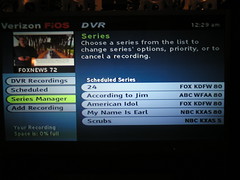
Scheduled Series (Season Pass Manager):

Menu (DirecTV Central):


One menu that DirecTivo doesn’t have is Verizon’s Mini-Guide. Here’s a picture of that:

Overall, I’m very pleased initially. Normally when I buy a new gadget or service, I’ve built it up so much in my mind that I’m somewhat disappointed. That didn’t happen with Verizon FiOS. I’m really happy with the channel selection. The only channel that I know I don’t have anymore is OLN (and I don’t watch NHL games or the Tour de France, so I won’t miss it). They also don’t have the NFL Sunday Ticket or NBA Season Pass (that I know of). So if you’re tied to those, you’ll be let down.
The biggest factor that motivated my to switch was the HD channels. Verizon offers all of the local broadcasts in HD and national HD broadcasts as well. I’m happy to now have TNT HD for NBA games (would’ve been nice to have Thursday night when the Mavs were on). The picture quality for the HD channels is at least as good as DirecTV was, if not slightly better. I haven’t noticed any difference in the standard channels.
The other feature I like a lot is the VOD. There are a BUNCH of free shows in from different categories. I like the sports options they have most. There are also selected music videos available. The movie selection is pretty good too. There are quite a few new movies (new to DVD, that is) available, such as: Batman Begins, Cinderella Man, Madagascar and a lot more available for $3.95. They also have a fairly extensive selection of older movies available for $2.95. Once you choose a movie, you’re able to watch it for up to 24 hours.
You can read more about FiOS TV from Verizon’s website. If you have any questions about the service, please comment and I’ll respond.
—Response to DylanE—
I notice in the screen shots that you are using the “grid guide†for both TiVo and Verizon DVR. Any chance that the Verizon DVR has a guide view closer to the normal TiVO style?
I never knew there was a different guide with Tivo. Maybe it wasn’t available with DirecTivo. If the normal Tivo guide style you’re talking about is the one that lets you view all the upcoming shows on a particular channel in the guide then yes–in at least a similar way. In the guide, if you highlight and select the channel it will show you the upcoming shows on that channel.
— Response to Fred —
2006-1-30 @ 3:01:01 pm
How does the season pass manager handle sports teams with games being on different nights and times? Is it able to do that?
From what I can tell, there is not a season pass type function that will automatically record based on specific criteria. You can seach for the actor/team name, but you have to manually choose to record from the search results.
I LOVE the VOD. We got FiosTV installed a couple of weeks ago and spent all last weekend watching movies. I got the Showtime package and they have free movies that they show on showtime but you can watch them whenever you want…that’s pretty cool I thought. I came from Dish Network so the whole VOD is a totally new concept for me…and I’m totally loving it.
Wow, thanks for the great review of the service and install.
Great Job
I notice in the screen shots that you are using the “grid guide” for both TiVo and Verizon DVR. Any chance that the Verizon DVR has a guide view closer to the normal TiVO style?
Thanks Kevin, that’s good to know.
How does the season pass manager handle sports teams with games being on different nights and times? Is it able to do that?
Kevin,
Nice review! I am looking into switching over to the FiOS.
Our DirectV and Tivo offer the pause one show for a few minutes and toggle over to the tuner to watch that channel. This is great for watching 2 shows without commercial interupption.
Is the FiOS DVR work in the same manner?
—–Reply by Kevin—–
No, it doesn’t have the same functionality with the two tuners. You can record two shows at the same time while watching another recorded show, but you can’t do the same dual-tuner trick. I did like that better about DirecTivo, but I haven’t really missed it that much (at least not yet).
How does the HD picture compare to DirecTV’s HD Lite?
—–Reply by Kevin—–
It’s at least as good if not better. I didn’t have the HD package with DirecTV the last few months. I didn’t think it was worth paying $11/mo for 6 channels. Overall it looks great!!!
Thanks for info on your FIOS TV. I just had mine installed on Friday. So far we don’t have many VOD show available, hopefully that changes.
How many hours of HD can you save with the 160GB drive?
Can you increase the storage via a second harddrive, larger replacement drive, and/or external USB drive?
How much is your complete package costing you (HD channels) Dvr rental ??
Great job man. I can’t wait to get FIOS in our area of Yorktown Va. I have heard alot about this FIOS from Verizon. The moment they r in my area I will try to get it.
Would you mind listing your HD channel line up?
Great review, thanks.
— Kevin’s Reply —
Local (Dallas) HD Channels:
ABC
NBC
CBS
FOX
PBS
UPN
WB
KDFI
National HD Channels:
TNT
ESPN
ESPN 2
*NFL Network
HDNet
HDNet Movies
U HD (Universal/NBC)
Discovery HD Theater
Wealth
Music HD (MTV/VH1/CMT)
*HBO
*Cinemax
*Showtime
*The Movie Channel
*Starz
*I don’t subscribe to these
Do you know if this DVR has the ability to copy video files to a computer like the TiVo desktop software TiVo-to-go could?
–Kevin’s Reply–
It does not currently have that feature enabled. From what I’ve read on a few different forums, the hardware capability is there, it just isn’t enabled in the software. I tried connecting my DVR to my laptop with the firewire and wasn’t able to copy anything (I didn’t try very long). The laptop recognized that a device was there, but I couldn’t find the right drivers to install it properly in XP. On Motorolla’s site, they have a Flash demo about the DVR that shows the ability to watch recorded shows on other cable boxes and computers. I guess that’s a feature for the future.
I already have FIOS internet access an am looking forward to FIOS TV when it becomaes available in my area. I have two questions (1) Is there an upfront charge for their HD/DVR receiver or just the $12.95 per month charge? And, (2) was there an installation fee for the TV service?
–Kevin’s Reply–
(1) There is no up front charge for the DVR. Just the monthly lease fee.
(2) There was not an installation fee when I signed up. They would install up to three rooms for free. I only got two.
Thanks for the complete description. I am having FIOS TV service installed this week and have been struggling with finding installation information. Your picture and experience with the NIM was especially helpfull. I have a tv near my router that I still would like to use (without a stb) – and from your comments, the coax out on the NIM should answer the need.
I’ve had my FIOS DVR for about 3 weeks. The picture quality is far superior than directv, I left both connected so I could switch between to compare. Arguably this is the best picture I’ve ever seen on my 4 year old Pioneer Elite 710. However, the software on the FIOS DVR is much worse than that of my old TiVO. The Tivo’s software is highly refined and fast. It’s smooth and intuitive. My new DVR is clunky and often slow (waiting 2-3 seconds to respond to queued?!? button presses… press once then wait, you may not like the results). The menus are harder to navigate and make more sense to me (as a geek) than they do to my wife.
I’m still sold, and my wife has used it exclusively, but it’s software/menus/remote are inferior. I hope these continue to improve as the product matures.
I’m also in the Dallas area and FIOS is coming to my house in about 10 days. I’ve been scouring the internet trying to determine which HD/DVR model Verizon was using because I needed to know if it was IR capable. (I use a Harmony Remote) Thank you SO much for your excellent review!
Boy, w/o wishlist or dual tuners for my purposes this is almost unusable. The great thing about tivo is once you’ve programmed it for your interests you never have to dork around again–you’re always covered. There’s practically no functionality possible that for me would make up for having to sit down and search out my shows constantly.
But that’s me. The good thing about your review is it highlights the plusses and minuses so everybody can decide for themselves what works best.
–Reply by Kevin–
There aren’t technically two tuners, but it doesn’t need them. You can still either record two shows at once, record one while watching another, or record two at once while watching a recorded show. It has the same functionality as dual tuners with only one signal input.
The lack of wishlist for sure is the biggest flaw.
The site mentions that you can record 1 show and watch another. I assume with dual-tuner that you can actually record 2 shows at once, which hopefully means you can record 2 shows and watch another pre-recorded show. Is this the case? Thanks for the info–very helpful.
–Reply by Kevin–
You’ve got it right. It can do exactly what you’re asking.
Excuse a dumb question but can you have multiple DVRs? Is there some type of splitter like used for DirecTV?
–Reply by Kevin–
Yes you can. When Verizon did the install they included a splitter (8-way, I think). There is no need for any additional splitters in most situations.
Hello, I just signed up for FIOS internet and TV service should be available soon. I’ve been following your info closely as I’m currently a DirecTV HD Tivo customer and am becoming disappointed with DirecTV’s HD offerings.
I downloaded the spec sheet on the FIOS HD DRV, but I thought I saw somewhere a link for the manual. Can you point me to where I can download the manual. THANKS!
Kevin thanks for the write-up and great pics. I just got FIOS Internet installed the other day here in NY. FIOS TV is still a few months away 🙁
I was wondering if you can confirm something for me. Where does the conversion from fibre to coax cable occur? From the pics, it looks like the TV signal comes from verizon fibre -> ONT -> cat5e -> router -> cat5e -> NIM -> RG6 coax -> STB.
Just want to make sure I can reuse all hte RG6 cable I pre-ran in now finished walls and joists.
— Reply by Kevin —
Very close. The tv signal is actually from Verizon > ONT > RG6 > STB. The NIM/Router are only used to confirm PPV purchases and Video-On-Demand. No TV signal actually goes through the CAT5e cable. I’ve been using my pre-run cable as well, so you should be fine.
Kevin:
Thanks for the review. On Directivo you can archive recorded shows by connecting a dvd burner to the rca out and using the “record to vcr” function. Is that possible on FIOS by using the s-video out? Or does the s-video go dark when the dvr is configured to use the component output? Any thoughts would be appreciated.
— Reply by Kevin —
I haven’t had a chance to check on the s-video question. When I get to it, I’ll post more info.
Kevin:
Thanks for the review. I currently have DirecTV HD and now that FIOS TV is available (Currently using FIOS Internet which is a huge leap forward from Comcast internet) I was considering switching.
Does the FIOS HD DVR let you fast forward through a show? Having gotten used to that feature it would be hard to go back to watching the commercials.
Also since the harddrive is only 160 Gbytes. How many hours of HD programming can be recorded? Is there any indication of the amount of recording time left? That is one of my biggest gripes about the DirecTV DVRs, they don’t show how much space on the disk is left.
— Reply by Kevin —
Yes, fast forwarding through recorded or paused shows can be done. In my estimation, about 20 hours of HD recording or so is possible. I haven’t tried to fill it with HD, but that’s my best guess. It can hold a LOT more SD programming.
Great review and information. I currently have Verizon FIOS and DirecTV. I have been considering FIOS TV and looking for a good comparision to answer questions and your excellent review has answered most of them. I have a couple other questions that you might be able to answer.
1) I am a little confused by the record one show and watch another description. On DirecTivo, both channels are recorded for 30 minutes by default which allows me to paush channel A, switch to channel B, watch channel B for a time, pause channel B, switch back to channel A, and not miss anything on either channel. How does this work on the FIOS DVR? Is their no 30 minute automaic record which can be paused? If there is, is it only for one channel and not both shows?
2) Does the HD content cost extra on FIOS TV? Are all the STB’s capable of displaying HD, or is it only the DVR?
(T)Hank(s)
— Reply by Kevin —
To answer your first question, there is no A and B automatic recording . . . only one channel is automatically recorded at a time. I think it will keep about an hour or so of the one channel you are watching.
The only extra cost for HD programming is the receiver. You can’t watch HD on a standard set top box. HD is included with the DVR. Basically, if you have a lot of TVs that you’re wanting to watch HD shows on, FiOS could get expensive.
Hello, I live in Denton Tx. I just had fios internet & television service installed and i like the service just not jumping up and down over it. The reason i switched to fios was because dish network wanted Three hundred dollars to install a hd dual tuner receiver in my home in which i thought was a little high especially after having the service for about three years. And i was also told if i wanted a standard dual tuner ( for another room ) i would have to buy one.
The tech that came out to install was great, and it took him about
four and a half hours. The internet service is a little bit faster than dsl in which i’m happy with that. No problems with it at all.
The television service is ok, the HD programing picture quality is awesome especialy HDnet ( they show programing from sci fi channel on there at times & the concerts are awesome to watch in HD)The local Hd isn’t much better than what i was receiving from my HD antenae i have on the roof top. Now, Regular programing, the picture quality is no better or worse than dish network ( i didn’t disconnect dish until i was sure that the picture quality was
about the same) so i switched between fios and dish to see if
there was any quality improvement.
The guide and menu’s are designed and programed by microsoft. I found the menu’s more appealing and easier to navigate with dish. Now if you have a woman in the house who is not tech savy you’re going to hear some moaning and groaning ! LOL
OK, now the problems i’ve seen with fios, sometimes while using HD the sound and lips do not sync up ( rare happening) I’ve seen some digitizing with regualar programing like satelite does ( rare also) I had to have one receiver replaced because of vibration and intermintent beep from hard drive in receiver. I had to have three receivers reset because on demand wasn’t working right, and i had to have a tech come back out because i had two lines going down the middle of the screen while watching fios tv, in which they fixed all problems very promptly.
Over all not a bad decision i made to switch to Fios. But i do have one question if anyone can answer what will the ethernet connection be used for other than connecting to the net ? update programing etc. ????
Oh maybe i should include the A/V equipment used in my line up. Mitshbishi HD ready 65 inch rear projection tv. A monster 5100 power supply. I have the video from the receiver going component hook up to tv and audio wise fiber optic from HD receiver to my audio receiver.
One thing I really love about the tivo is that it records things it thinks you might like based on previous ratings. Does the FIOS DVR do this? (This might be a show stopper for my wife)
— Reply by Kevin —
Unfortunately, no it does not. I believe that is an exclusive feature of Tivo.
Thanks for taking the time to answer questions about the FIOS DVR. I love Tivo so much I had it tattooed on my arm, so this is a tough choice for me. I saw a post on another forum, about fast forwarding through commercials with a DirectTv Tivo and how it jumps back a couple of seconds when you stop, which by the way I am the master at in my house. Does the Fios DVR do that?
— Reply by Kevin —
The DVR does jump back after you’ve been fast-forwarding, much like the Tivo does. The original box I had didn’t do it at first, but after they released a firmware update that feature was enabled.
I would like figure out an issue that is going on with my FIOS service. The service is fine and all but…the NIM100 sits on the router and aquires and IP. Once the IP/MAC is noted in the DHCP list I open ethereal and watch the nim go crazy! While it has and IP is is requesting other information and a default IP in the 165 range. Could some one explaine this one.
— Reply by Kevin —
My best gues for what it happening is that the NIM is communicating with your set top boxes. Not sure about that, but that would make the most sense to me.
Fios will be available in my area soon. Does the DVR allow you to copy parts of a recorded show to a vcr or dvd recorder. My current cable box dvr allows this. I dont use any special set-up. I have the dvd connected to the box and tv so I can watch a disc. I press play on the dvr and record on the dvd, and it records what is on the screen.
Can this be done with the verizon dvr?
—Reply by Kevin—
I’ve never tried to record anything from the DVR to another format. I don’t know if there is an option listed as “Record to VCR” or something similar. But I know there are RCA outputs, so I’m pretty sure you’ll be able to do what you’re asking.
Thanks for the info. I am about to make the switch from Direct to Fios, and I was wondering if there is any new info on a ‘wish list’ type of recording option yet. Am I correct in that it will record all future episodes (like a season pass) of a particular show (ie ‘Big Love’), but you cannot just enter “Brad Pitt” and it will find and record everything with him in it?
How do you handle football games? Would I have to search out every Titans or Cowboys game and ask it to record them individually?
Thanks so much for your insight!!
—Reply by Kevin—
You are right, there is not a “Wishlist” option right now. Frankly, it’s the weakest part of the whole system. I’ve heard that there is a new version of the DVR in the works that would most likely include it, but I haven’t heard of any release date yet.
For recording sporting events, I’ve just gone through and clicked record in the guide. I don’t record too many games, so this hasn’t been a big deal to me. The guide has the ability to advance ahead by day, so it’s pretty quick.
My Fios TV service is being installed in a couple of weeks, so I was searching for more information. The detailed overview (with pictures) is great – it answered every question I had – thanks!
I too am ditching DirecTV for Fios – a tough decision at first because I’ve been with DTV for many years. But, Fios really seems to be the better deal.
Great Review! Thanks for taking the time to answer the questions.
My question is: can I record network TV (abc, fox, etc) at either standard or HD resolution on the DVR? Just thinking that I would rather save more of network shows I watch – than to save them in HD and have them take up more space
—Reply by Kevin—
There are two different network TV channels. One is HD (when available), the other is only standard. You could do exactly what you’re wanting to do by choosing to record the shows on the standard channels.
Does Verizon DVD allow users to scroll down the entire list of programs on available channels (1-9, A-Z) in the Search by Title menu? Although painfully slow with Tivo, this was a great way to pick out gems in forthcoming weeks’ programming which would have otherwise gone unnoticed. Verizon DVR lets you search, but then doesn’t seem to let you record from that search menu. Also, you can’t seem to progress further on the search menu list, pnce you select a given program for more info… it boots you out, and you need to conduct a new search (and ferret your way back out to K or wherever you’d left off).
Finally, the technician showed me an extensive menu of video tutorials, but the only help I can find now is a pathetic few lines of text on a given topic.
Thanks for the effort here. Any change requires some getting used to, and involves trade-offs.
Hello Kevin,
I just got my Fios yesterday and they installed a QIP 6416-2 for my DVR.
This has a 160Gb hard disk capacity.
Great write up. FiOS is here in Leesburg VA and FiOSTV as well as of this week. I’m curious if you’ve discovered whether you can program a 30 sec. commercial skip (doubt it’s actually included)…
I just got the verizon fios. Your details are great!! It took our one guy from 10:30 am to 11 PM(a second guy came at 7PM) to hook us up. What a project!! I’m having trouble recording on the vcr. No I didn’t get the dvr. I didn’t like that it only records 2 programs. Thought about TIVO-more options. Do you have any vcr recording hints!lol, I’m on #3 and still getting static, cable on, cable off. Tv on, off, vcr on #3, on #7. just a frustrating mess!!Thanks!
I have had Fios for a couple of weeks. I see the poential for a serious problem developing. There have been a couple of short outages. When they happen, sometimes they leave a still picture of the last programming being watched. On my DLP tv this is not an issue as screen burn-in does not occur. On my other CRT tvs it may become an issue. While watching the DLP late last evening an outage occured leaving the still image. I changed the channel as I was not sure if it was a networ issue or the whole Fios system. It turned out to be the whole system. Once I changed the channel the still image disappeared. The service came back on a few minutes later and all was well. About an hour later I went to bed and looked in on my mother who is 87 years old, has dementia and lives with me. She usually leaves her tv on all night as kind of a security blanket. When I looked in on her there was a still image on her tv and I got the remote and chaned the channel and everything was back to normal. There was no apparent burn-in damage done but some CRTs are more sensitive than others to burn in. I had a large screen rear projection CRT that burned-in an image when I left a paused playstation 2 game on the screen and fell asleep for about an hour. The real potential problem is the fact that when the service went out and came back on after a few minutes it did not clear out then still picture on my mom’s tv until I changed the channel leaving it there for an hour. I have comtacted Fios and made them aware of this and the tech recognized the seriousness of the issue but said he had not heard of this problem previously. Has anyone else experienced the “still image” left on the screen during an outage?
Thanks for the review. I was reading about the multi room DVR feature. Verizon claims you can watch your recorded shows on multiple tvs. Is this something extra? If you have it, do you like it? I read that there are a lot of pitfalls, including not being able to watch HD recorded programs in other rooms.
–Reply by Kevin–
I don’t have the multi-room DVR, yet. From everything I’ve read it seems like you will be able to watch a recorded show on up to three different rooms. You’re supposed to be able to pause the show in one room and resume watching it in another. The HD recorded programs is true. It makes sense, though, because the other receivers are standard definition boxes and you can’t watch normal HD feeds on those anyway.
I have had fiostv since the beginning. I live in Keller which is where the whole Fios started and I had that from the beginning. I’m very happy with the internet service, but i’m not as satisfied with the TV.
I have had to switch out my set top box twice already. I’m constantly getting “updating” type messages which isnt really the case as the box is jacked up again. The fix is always to unplug it and let it sit for a few minutes to reset. But this time its not resetting? Its annoying as hell because when it does it you cannot pause or do anything.
Now the NUMBER ONE thing Tivo has over FiosTV. The recorded programs are accessable ANY time on Tivo. They are NOT accessible on Fios if the box is being updated. I have my old DirecTivo unit in my room and its full of recorded programs. The kids can still watch it even though I have no service.
I’m seriously thinking of cancelling FiosTV and going back to DirecTV. I’m having too many problems with it. PLUS there are a few channels that are not on the basic package that are on DirectV’s go figure.
Why is OLN (versus) not on FIOS TV. I urge all who read this to call verizon and get them to add this channel to the FIOS line-up. Me like Hockey!!
G4 tv is also not in the basic lineup. Sucks.
Does anyone know how the capacity of the HD DVR from from Verizon FIOS compares to that from DirecTV? We recently are up on the FIOS Internet but we still have DirecTV. We paid the $999 for the DirecTV device and I totally annoyed that the device will not support local HD channels, despite assurances that it would by DirecTV when I first purchased it. Not to mention that you could buy it for 1/3 of the price within 3 months of us buying it. Class action lawsuit maybe? In any case, we record a lot in HD and it is a major hastle to go through deletion gymnastics to make space for new recordings. The hard disk capacity is totally inadequate for HD and it seems silly with the low cost of hard disk storage these days. Does FIOS have the same or a better capacity than the DirecTV HD DVR?
— Reply by Kevin —
The FiOS DVR actually has less capacity than the HD DirecTivo. I believe the hard drive is 180 MB. This lack of storage is magnified by the fact that the FiOS HD channels are less compressed (by far) than the HD DirecTV channels. So, less space + more space required = much less recording time. If you do record a lot of HD shows you’ll need to delete a lot of programming to stay current.
Updating the firmware in the set top box on FIOS, is it over the “wire”? I assume you do not have physically swap-out boxes?
Where is channel OLN?
I just signed up for the Verizon FIOS switching from the Direct TV Tivo. I love Tivo, but am willing to make some sacrifices. The dual tuner comments are confusing to me. With the DTV Tivo, I can watch two live shows at the same time and pause either channel, which is great for football or other shows. Are you saying you cannot do this w/ the Verizon DVR? Are you able to watch two live shows at the same time or just record two shows at the same time?
I was told by Verizon the NFL Network is included in the normal programming, is that true?
PS. Love the blog, it’s good to hear some technical insight into the technology.
—Reply by Kevin—
You can only watch one live show at a time. You can, however, record two shows at the same time. I did like the Tivo’s feature of being able to watch two live shows on the separate tuners. Verizon does not have that. You technically would have to watch the recorded show to flip back and forth between two live shows.
And, yes, the NFL network is now part of the normal programming. And if you have an HD receiver, NFLHD is included as well.
Best review of FiOS on the web, Kevin. I actually have two Panasonic Showstoppers (ReplayTV) because I like the interface better than TiVo and the “Quick Skip” feature that lets you jump ahead in 30 second intervals to blast thru commercials on recorded shows – rather than fast forward. Does the FiOS DVR offer this option?
— Reply by Kevin —
Thanks for the kind words. There is not a “skip” button on the remote. So, I am stuck fast forwarding.
Thanks for the note on dual tuner. I can get around it by recording one show like you said and then watching another one live. Then, once I’m done w/ the recording, I can delete the show. That should work, eh.
What is the total recording time for the Verizon DVR when not recording on HD? The DTV Tivo can record 80 hours of normal TV. Is the Verizon DVR close?
— Reply by Kevin —
I haven’t ever completely filled it up with standard def programming, but it would probably hold between 100-120 hours of regular programming. It holds A LOT LESS HD. I think you can only get about 20 hours of HD. I think the main reason for that is that it doesn’t compress the HD signal nearly as much as DirecTV or Dish does. I don’t have any technical data on the compression ratio to back that claim up, though.
Presently have Comcast analog cable. Recently purchased the Tivo 180 hr. Series 2 DVR with service. FiOS should be installed within 2 weeks. We are planning on purchasing a plasma TV and have realized that our TIVO DVR is not HDMI compatible (not interested in paying the $800 for Series3), but Verizon’s DVR is. We are still within the TIVO 30 day guarantee and wonder if it is worth getting the DVR through Verizon? I have been happy with TIVO and really like their “exclusive” features like online scheduling and TiVoToGo. I’m trying to figure out the pros to DVR. Do you think it’s worth switching? Thanks, Kevin.
–Reply by Kevin–
The picture quality from the FiOS DVR is really good. Its biggest downfall is the limited storage of HD programming. It’s a trade off.
I’ve noticed, or have not learned yet, that I cannot watch a live show while recording another show. If I want to watch show (a) while recording show (b), I need to record both shows. Is that true or is there something I have not learned yet?
You can disregard my last posting, the installer did not set it up correct so I had to fix it.
Are you able or have you tried to split your FIOS coax cable to run into the FIOS Cable Box and into the Direct Tv DVR? I still have the Direct TV DVR and wanted to see if you tried to use it w/ Fios and if you can split the signal.
Please let me know. Thanks.
Mark
Re: 30-second skip. There’s no button for it on the Verizon-supplied remote control, but when I set-up my Harmony remote — bingo! — there it was. 🙂
I am in Carrollton, TX and had the FIOS installed. After 28 days I called Verizon and canceled as I found the DVR to be nearly worthless (very buggie software). If you have had a TIVO or DirecTV TIVO unit you will be sadly disappointed. When I went back to DirecTV and they sent me the new DVR that is not TIVO. This is nearly as bad as the FIOS DVR. I reverted to my old DirecTV TIVO DVR and life is good… The dual channel buffer is the feature that I cannot and will not live without. If you use it and are used to using it there is no substitute. After going through several layers of Tech support at DirecTV it seems that TIVO has a patent on the functionality and will not allow other DVR manufacturers the functionality without a little royalty… so, in the immediate future I am tied to my older DVR.
I am have a simple 301 Dish receiver that is exclusively used for a foreign language reception. Can I shoot its output to an input of my VERIZON DVR for recording purposes ?
They said many months ago that this will be enabled one day.
Can you record PPV or OnDemand movies with Verizon Fios to the DVR’s hard drive?
Do you have the ability to extend the recording? On my D*, I can tell the recorder to stop x minutes/hours later. I do this as a matter of routine for football games where the schedule is notoriously shorter than reality.
— Reply by Kevin —
Yes. It’s an option you can choose once you’ve set a program for recording. I do the same thing for all the sporting events I record.
OLN is now VS I believe so you probably have it
i just got my fios tv and was tring to grab the recorded shows off the QIP6416. im doing my usal poking around and see the the stb’s have ip address. has anyone tried getting into them via the network?
I have had Fios for a couple of weeks, have had a lot of issues. The latest is that I can’t get any of my VCRs or DVDs to work. The Verizon hotline is not much help.
How should they be hooked up to the system?
When enabled can you record and play back the TV shows?
What channel do you play them back on?
Any comments would be greatly appreciated
I’ve been debating the FIOS = Satellite switch for a while now. The FIOS ISP is quite nice and although a bit Mac unfriendly at first, I am now getting 15 down and 2 up throughout the house, even on wireless at times.
My D-TV DVR is a series two that I purchased online and had the reseller add a second hard drive. I think I get a couple hundred hours or SD record capacity. I sorely would hate to give that up even though HD recording is not possible. It has not been a big deal overall.
What is a big deal is as one person who comment asked… is the capacity expandable? Either internally or via a USB/FW/NAS type of drive?
Also with the advent of devices like Apple TV and Tivo to Go, it is becoming more and more relevant when making these decisions to not lock into another’s proprietary domain as Verizon/Microsoft prefer. D-TV is not much better with regard to limits, nor is Tivo, but FIOS, though a free install is a major installation process to one’s dwelling.
Anyway Kevin, have you or any of your readers ascertained either from experience, or from Verizon whether these DVR are expandable?
Thanks
~S
Lenny, I already did my poking and got nowhere. The DVR and STBs do get assigned an IP addres via DHCP. Oddly, even after they get an address assigned on the local network, they’re still broadcasting with the 169.254.x.x address as they were before they received their IP. A network scan on the QIP6416-2 shows the following ports open:
TCP 21303
TCP 21306
UDP 68
UDP 5000
UDP 5020
UDP 33795
UDP 48587
I tried connecting to the TCP ports with HTTP, TELNET, FTP and SSH with no response. I too would like to be able to copy recorded shows off to burn to DVD if anyone has figured it out. Best I’ve got for now is to connect your laptop to an output, play on the DVR and record on the laptop but that’s such a waste of time.
Hello..
Thank you for your site. We are considering Fios, but we are on a strict budget. What are the taxes for Fios Internet and Fios TV?
Thank you.
Jeff — I’m sure the taxes vary depending on your location and what equipment you have. My FIOS TV taxes are $8.13. Internet service does not have a separate tax but “taxes and surcharges” on the whole phone/internet are $7.19 in addition to the Federal subscriber line charge of $6.50.
Can you easily record shows from the hard drive out to another DVR recorder to save programs on DVD?
Thanks
— Reply by Kevin —
It would depend on the other DVR. I don’t know of any major brand DVR that has a line in at this point. However, if you have a stand-alone DVD recorder you should have no problems once you get everything hooked up right.
Great stuff. Have enjoyed reading all the responses.
I’ve had DirecTV with TiVo for several years, and haven’t switched to FIOS TV because of the NFL Sunday Ticket, which I’ve had since the late 90s. I’m addicted.
Question: The VZ sales guy told me there was a way to “throttle down” my DirecTV service to the bare bones service – thereby still allowing me to still get the Sunday Ticket (since VZ won’t be offering it), while using VZ FIOS as my primary programming. If I decide to do this, would I have to use my DirecTV DVRs with TiVo to record NFL games through Sunday Ticket? And would I still need to get the VZ DVR service to use for my VZ channels? I assume that the answer is “yes” — that I’d have to have DirecTV with TiVo for the NFL games, and any programming on VZ’s service would be recorded by the VZ DVR.
Has anybody done this, or am I totally crazy? FYI, I set up an installation for FIOS TV for several weeks out, so I can investigate how to/whether I can use both, and what would be required if I did so. I don’t know if it’s worth it to switch over to FIOS, since DirecTV has been fine, I love NFL Sunday Ticket, and really like the TiVo User Interface.
— Reply by Kevin—
I’ve never personally done it, but I imagine that what the rep meant by “throttle down” is do only carry the very basic package plus Sunday Ticket with only one receiver. Your setup would work fine as long as you had enough inputs on your TV or an input selector. Any way you go, you’ll love the improvement in the HD channels. VZ is much better in HD.
I just got the fios.. and seem to have it mostly figured out.. However do you know if there is a way to set default settings for the DVR so that i dont always have to tell it to save 5 shows or first run only? i know on tivo you could tell it how it should normally record. Right now, the process of going back and forth between the options for every series recording is pretty cumbersome. any help is appreciated.
— Reply by Kevin —
I don’t know of any way to change the defaults for all shows. I usually just set each show individually, which isn’t a big deal to me because I usually want to keep different amounts of all the shows I record.
Thanks for the detailed review! I recently switched from Dish Network to FiOS. Hopefully the new interface coming out will resolve a lot of the usability issues (When compared to TiVO). I wrote a detailed review as well on Verizon FiOS TV http://www.defefx.com/verizon-fios-tv/ Let me know what you think.
Thanks.
I currently have a DirecTivo. I don’t want to give up my TIVO features, is it possible to get FIOS but buy the TIVO separately and use it with the FIOS service? Do you know which TIVO series I would need to purchase?
—Reply by Kevin—
I’m pretty sure any version of TiVo will work with FiOS. I don’t have one so I can’t confirm for sure, but I think any version will work.
great review ! i wanted to switch to fios . because the only reason i have a home phone . is because my directv dvr has to be connected to a live phone line . with fios i do not need a phone line .
i had doubts about the picture quality . the directv picture quality is fantastic . for me it is all about the picture . your review and othe comments have helped me make my decision to switch fios . thank you .
I used to have Directv before, recently switched to Fios tv and internet. I see that they have connected one of the cables coming out from the previous Directv dish into the Verizon box outside my house (like the one in the 2nd pic on this page). Do you know why they need this Directv feed into Fios tv? I was told all the channels are 100% coming from fiber optic cables (i.e Fios router).
Overall I want to thank you for this article.
A few comments: Since you originally posted this, there are HD Tivo units, such as the Series 3 HD and the TivoHD. This pretty much cleans up the lack of a great DVR cablebox by FiOS.
Overall I’ve been pleased with teh quality of their service since I switched from Comcast. I have to say that dealing with Verizon FiOS TV tech support is much more enjoyable. I’ve got 1 Tivo Series3 unit with 2 cable cards, and 2 Tivo Series2 units with Verizon STBs.
I’ve using a more industrial type firewall with an NIM100 to allow the STBs to get all of their guide data (not needed with the cable cards).
The Tivo Series 3 and the TivoHD both work GREAT with FiOS!
You can get Cable Cards from FiOS without issue, as they, and all cable vendor are required by law to give them to you.
I’d also add that anyone out there that has a network enabled STB or Tivo or network enabled DirectTV unit can add NIM100s to their cable system in order to provide internet connections to their equipment. This eliminates the need for phone lines for the newer ethernet enabled devices. (Verizon STBs have NIMs built into them, and Tivos can use wireless or wired ethernet…)
Question: I also have DirecTV’s Ultimate TV but with a
Sony unit. It is an excellent component and I am having
a hard time giving up it’s functionality for either Fios
or Directv’s HD equipment. I have heard horror stories
about DirecTV’s HD DVR units. One question I have is
FIOS’s DVR ability to start watching a recorded program
before the program is totally recorded and having the recording continue? Currently I am able to start watching
a recorded football game 1 hour into the game and fast forwarding thru the commercials all while the Sony unit is still recording the rest of the game. Can FIOS do this?
—Kevin’s Reply—
Yes, you can start watching recorded programs while it is still recording. Verizon recently updated the DVR software, so the interface looks a lot better now.
Hello,
I just got Fios installed and it appears I have the same DVR model as you do. In addition to the DVR, I have Sony DVD Recorder. Now, I’m attempting to connect my DVR to my DVD to record at will. Can you please provide any information that can assist me with getting this resolved. It would be greatly appreciated! Thanks in advance.
Model of Sony DVD SLV-D37OP
— Kevin’s Reply —
I don’t have one, so I don’t know this for sure, but I think DVD recorders work about the same as a VCR. You have to record in real-time. So you would need to hook up the cable of your choice (composite/component etc.) from the output of the DVR to the input of the DVD recorder. Check the user manual that came with your recorder for specifics.
I have DVR and two standard rooms and one HG room. The standard rooms can’t see DVR
— Kevin’s Reply —
You’ll only be able to view the DVR from the standard receivers if you pay the extra $7 per month for the Home Media DVR (or something like that).
Great review. I have DTV and have been debating whether to switch to FiOS. This review is very thorough and has answered a lot of my questions.
I can’t record anything on my VCR now that I have FIOS. Is my VCR now just an antique or is there a way to do this that I (and the service tech I talked to on the phone) can’t figure out? This is the best info I’ve ever seen on FIOS. Thanks for your willingngess to share.
— Kevin’s Reply —
I personally haven’t hooked up a VCR to my TV in about four years, so I really don’t know from experience. I’ve always assumed that you could hook up the composite outputs (the red, white, and yellow connections) to the VCR inputs and record. Hopefully that will work for you.
Kevin,
You are truly insane.
But don’t worry, so am I.
Sincerely,
Josue.
PS: I got an Alvarez guitar.
All that work to hook up the Fios TV, and all you watch is Fox News from your screen caps?
What a waste of the fiber optics.
i have fios, but I can play my dvr's and video but can not record. I have called the Recorder mfg, Fios and each one states i can hook it up. I have a New Viox HD 720p TV. Its a shame, but FIOS states I need there recorder but at $250 a year I could buy a new one. Do they make a DVR Recorder that can work with FIOS and not the Verizon one. FIOS states only theres can be used. Its a shame that I can not buy one with paying FIOS. Any suggestions on what would work. Really hate to buy a new recorder but I like to record music and play it in my car (even a show).
TY
Verizon doesn't like to promote this, but you can use a cable card enabled Tivo with their service. You'll have to pay a monthly fee for each cable card you use (2 tuners = 2 cable cards), but it works out to about the same cost over a 2 year period. My brother and sister both bought Tivo HD DVRs and use it with their Fios service. They're both really happy with the setup the have.
Here's the tivo they bought: http://bit.ly/JBi4
I love our FIOS service even more…now that we have a TiVo unit. The Motorola unit that Verizon uses is garbage. We gladly sacrificed the loss of our On Demand option for a DVR that functions consistently, doesn't reset itself for no particular reason, and has better auto-record options. If Verizon will update and improve their DVR, they've really got the best thing going with the Fiber-optic cable signal.
FiOS really change how we watch TV you should check out their offers…it's 2009 and they have more things to offer.
I hope to return to Verizon for tv asap. I am pianyg few extra bucks a mo. to keep Verizon for phone and now broadband. You betcha I am on the notify list for FiOS in the future. My Comcast service won’t provide tracking for the new equipment! I will certainly avoid Comcast anytime since verizon is only ever down when PECO subcontractors have accidents tree trimming! And absolutely nothing takes 3 to 5 days to get done with Verizon. At least we will have netflix!
Hi Kevin. Thanks for such an elaborate description. It has helped. One thing that was not too clear for me was the recording on the DVR. Do you know if this DVR will record automatically every week/day the program (episode) chosen. I currently have Cox Cable and with them when I want to record a program, I go into the guide select the program I want to record and then it gives me the option of recording one episode or recording all (if I click record all – it then gives me several options on whether I want to record all episodes or first run episodes and so on). Typically I like to choose first run and then I don't have to manually select the program that I want every week. It automatically sets it up for me every week. Thank you!
Hi Bertha,
Thanks for your question. Fios has released a new version of the DVR in the past couple years, so this review is out-of-date now. But to answer your question, yes, their DVR does have the option you are asking about.
Good luck!
Kevin
You may want to check out DirecTV again…. many of my neighbors have fios and switched back to direcTV. New, bigger dish, practically everything’s HD, far superior picture (not that fios is bad, but satelite is better!). Just sayin’….
Thanks for the feedback. I’ve dropped cable all together for now. I’ll look at my options if I ever decide to get it again.
[…] display engine blue LED LCD TV, with three-dimensional definition of the perfect 3D render click. Done across any progress of animations television. TCL was carried out so that you can “3D […]
I have fios tv.i have been recording shows to a dvd-r. Then last week fios did an update and now everything on tv is un recordable. Help please. Thank you
ps. I have a philips dvd HDD.
You should call DirecTV. I’m not affiliated with them.